
September 4, 2026
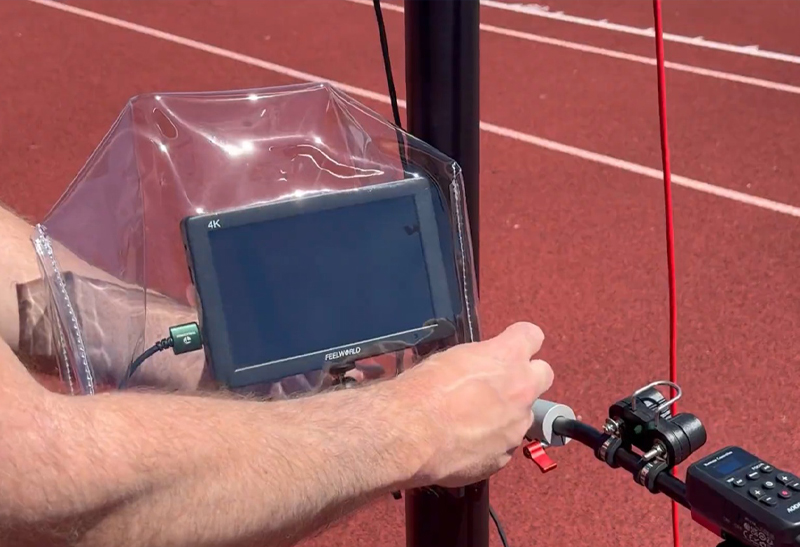
A light rain can turn into a video problem fast. One quarter starts with a few drops on the lens, then the operator is wiping glass between plays, the tripod is slipping in soft ground, and the feed to replay becomes unreliable. Protecting football cameras from rain is not just about keeping the camera dry. It is about preserving stable, usable coaching video through the entire game.
For football staffs, the best approach is simple: prepare a rain plan before kickoff, use protection that does not interfere with framing or operation, and keep the camera system stable when conditions get messy. A camera that stays powered on but produces a blurry, rain-streaked image is not doing its job.
Rain protection begins with the equipment you put on the field or in the press box. A stable endzone system, quality tripod, and secure mounting hardware give your operator a much better starting point than a lightweight setup that shifts in the wind.
A 25-foot endzone camera setup has more exposure than a handheld sideline camera. It sits above the field, catches wind, and may be operating in steady rain for several hours. The goal is to protect the camera without adding loose material that can flap into the shot, shift the camera angle, or make controls difficult to reach.
Before the season, confirm how your specific camera is rated for moisture. Many consumer and professional cameras can handle a damp environment better than they can handle direct, prolonged rain. Weather resistance is not the same as waterproofing. Do not assume a sealed body protects open ports, battery doors, external monitors, or cable connections.
A fitted rain cover designed for your camera shape is usually the best option. It should cover the body, battery compartment, and control area while leaving a clear, secure opening for the lens. If you use an external monitor, it needs its own protection. A wet monitor screen can be hard to see, and water around a power connection creates a much bigger issue than a wet camera body.
The lens is the part of the system that determines whether coaches can actually use the footage. Even a well-covered camera will deliver poor video if water is collecting on the front element.
Use a lens hood whenever the camera and lens allow it. A hood will not stop wind-driven rain, but it reduces the amount of water landing directly on the glass. It also gives the operator a little more time between wipes during a steady shower.
Keep clean microfiber cloths in a sealed, dry bag at the filming position. Avoid using a wet shirt, paper towel, or sideline towel to wipe the lens. Those materials can smear water, leave lint, or scratch the coating over time. The operator should wipe gently, check focus, and return to the frame quickly.
In heavier rain, a clear lens sleeve or a rain cover with a built-in lens extension can help. The trade-off is that any transparent material placed in front of the lens can create glare, soften the image, or collect droplets of its own. Never stretch a plastic bag tightly across the front of the lens and expect clear game film. Protect the lens barrel and camera body, but keep the optical path clear.
Most weather-related failures happen at a connection point. A camera may tolerate a little rain while an exposed HDMI, SDI, USB, or power connection does not. If your game-day workflow sends video to a replay platform or records to an external device, cable protection deserves the same attention as the camera cover.
Route every cable downward before it enters a port. This creates a drip loop, meaning water traveling along the cable falls away at the lowest point instead of running directly into the connector. Secure the loop so it stays in place when the tripod moves or wind picks up.
Cover connections with purpose-built weather sleeves or protected junction boxes when possible. Tape alone can help hold a cover in place, but it is not a waterproof solution. It can also leave adhesive residue on cables and ports. Keep power strips, adapters, battery chargers, and signal converters inside a dry case or protected area, never directly on wet turf or concrete.
Battery power can simplify wet-weather operation. A fully charged internal battery or properly protected battery system removes one exposed power connection from the setup. For longer games, have dry replacement batteries ready in a sealed pouch. Swapping a battery is far easier than troubleshooting a wet power supply during the third quarter.
Rain rarely arrives alone. It often comes with wind, slick surfaces, and soft grass around the end zone. That makes tripod stability a video-quality issue as much as a safety issue.
Set the tripod legs wide and make sure each foot has solid contact with the ground. Do not place a tall camera system over a drainage ditch, loose rubber pellets, standing water, or a soft patch near the end line. If the ground is saturated, use stable foot pads or move to the firmest approved filming location available.
Add weight low on the tripod when conditions call for it, but do it correctly. A sandbag or weight secured near the tripod base can reduce movement. Do not hang a heavy bag high on the center column, where it can swing in the wind and create more vibration. Keep the center column as low as practical while maintaining the angle your staff needs.
For elevated endzone filming, never leave the system unattended in worsening weather. A manual camera setup gives the operator direct control without relying on wireless signals or motorized components that may be less dependable in rain. But it still needs an operator who can monitor wind, framing, lens condition, and field safety.
The most reliable rain plan is one that travels with the camera system. If your covers and cleaning supplies are stored in a separate office, they will be unavailable when the weather changes during pregame.
A practical wet-weather kit should include a fitted camera rain cover, a separate monitor cover if needed, several microfiber lens cloths, absorbent towels for the tripod and case exterior, weather sleeves for exposed connections, spare batteries, and a dry storage bag for media cards and accessories. Include a few secured weights if your filming location regularly sees wind.
Keep the kit organized in a labeled compartment of the equipment case. That lets a student manager, assistant coach, or video staff member find it quickly without guessing which cover fits which camera. Rain protection should not require a technical specialist. The right equipment and a repeatable setup process let any trained operator keep filming.
Check the forecast when you confirm travel, not when the first drops hit the press box window. If rain is likely, install the camera cover before setup and bring the full wet-weather kit to the filming location. Starting dry is easier than trying to cover an operating camera during a live drive.
Before kickoff, inspect the lens, check every cable connection, verify battery capacity, and record a short test clip. Watch that clip on the same device your coaches use for replay or review. This confirms that the picture is clear and that the workflow is working before the game creates urgency.
During timeouts, quarter breaks, and halftime, inspect the lens and cover for pooled water. Wipe the lens as needed, but do not repeatedly open the cover unless you must. Every opening gives wind and moisture another path to the camera body and ports.
If lightning is present or field personnel are instructed to clear the area, follow the school and venue safety plan. No film angle is worth putting an operator near an elevated tripod during dangerous conditions.
Do not pack a wet camera and rain cover into a closed case immediately after the game. That traps moisture against the equipment and can lead to corrosion, odor, mold, or condensation at the next use.
Bring the system indoors, remove the cover, disconnect accessories, and dry the exterior with a clean towel. Leave compartments open in a clean, dry room so moisture can evaporate. If the camera was exposed to significant rain, allow it to return to room temperature before charging batteries or sealing it in its case.
Check the lens, ports, tripod locks, and cables the next day. Catching moisture in a connector early is far better than learning about it when your endzone camera is needed for Friday night film.
A dependable football video operation is built before the weather turns. When covers fit, cables are routed correctly, and the tripod is stable, rain becomes a manageable game-day condition instead of the reason your staff loses valuable coaching footage.